EzImage is a full fledged Image Editor/Processor with some very powerful features built in. EzImage can help you organize & scan your stamp & coin images now! EzImage will save you a lot of time. With Auto-separate, Auto-rotate, Auto-crop, it will reduce your image processing time significantly.
It includes a complete image processing lab on your PC. Our thumbnail browser allows you to display groups of images and organize them and select them for editing in EzImage. EzImage also has powerful File Conversion utilities built in. Auto-separate tool is a must have feature.
Are your stamp images in disarray? Do you know where your images are? Tired of wasting time trying to find your stamp images? Are you spending too much time scanning instead of selling? Need to keep track of your images?
With EzImage, the time intensive chore of scanning, cropping, rotating your images is made easy. Let EzImage help you Organize and Scan your images. It’s easy & it’s fast. Spend more time selling & making money! EzImage is a program no stamp or coin enthusiast should be without. If you value your time, then EzImage is for you. Dealers, collectors & eBay sellers worldwide use EzImage to process their Stamps & Coins for their websites, eBay & image databases.
Amos Media/SCOTT
Bill Longley Auctions
Brookman Stamp Company
Century Stamps & Coins
Comuterized Digitising Inc.
E.S.J. Van Dam Ltd.
Eastern Auctions Ltd.
Eric Jackson Revenue Stamps
Germania GMBH
International Stamps
Jay Smith & Associate
Lakeside Stamps
Michael E. Aldrich Inc.
Museum of Natural History
National Duck Stamp Collectors Society
Phoenix Auctions
PostRoad Co.
Premier Postal Auctions
PSE (Professional Stamp Experts)
Rare Stamp Exchange
Sam Houston Duck Co.
Saskatoon Stamp Centre
Schwanenberger Verlag GMBH (Michel)
Shreves Philatelic Galleries, Inc.
Smithsonian Institution
Subways Stamp Shop
The Philatelic Foundation
UN Postal Services
US National Archives
USID/Stampfinder.com
eBay
-
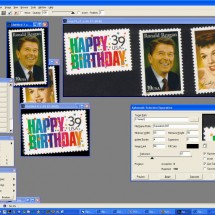
- Auto-separate of images
-
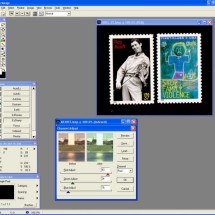
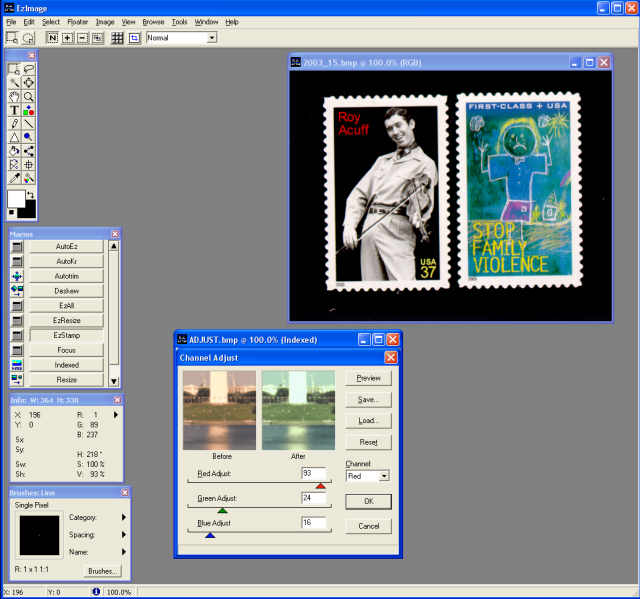
- Color correction
-
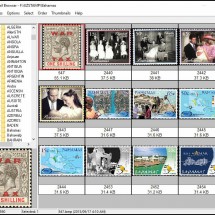
- Thumbnail Viewer

Features
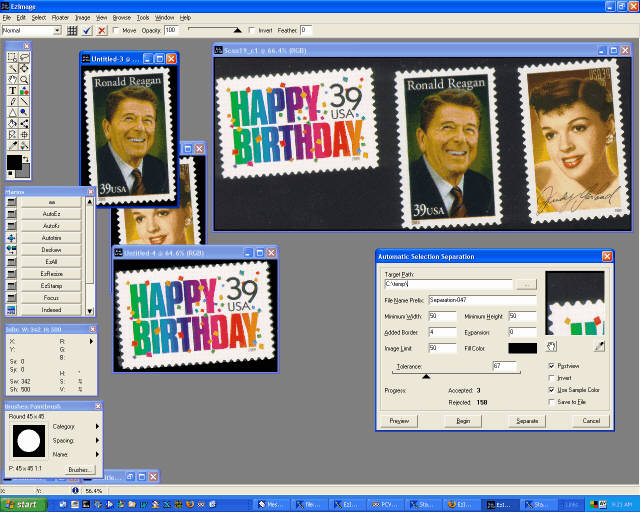
- With EzImage, you can scan many stamps at once & then with one click, automatically separate them into individual images. (Pro version only). You must scan against a contrasting BLACK background for images to properly separate.
- Crop, color correct, retouch, add special effects, use custom color palettes and use the dozens of tools we provide to make your images look their best.
- Give all your image processing projects that professional look & feel .
- EzImage supports all TWAIN compliant scanners.
- File conversion utilities (supports almost all image file formats)
- Specifically designed for stamps & coins to save you incredible amounts of TIME processing images
- Starting at $64.99 STD edition
- View more info
Screenshots
-
- Auto-separate of images
-
- Color correction
-
- Thumbnail Viewer
Testimonials What are people saying about EzImage?
Ezimage is absolutely fantastic. I don’t know how we ever did without it. Scanning, trimming, straightening and processing large quantities of images has become a very simple and easily automated routine. We have tried many of the other programs, but there is nothing like Ezimage
ESJ van Dam, www.canadarevenuestamps.com
WOW! What a great piece of software. I have been selling on eBay for over one year now and the most tedious part of the selling process has been the imaging process. A friend recently recommended Ezimage, but I was initially skeptical. I have Adobe Elements and am ok using it. But Ezimage really shines when it comes to image processing. The fact that I can scan a whole page of stamps and it separates them into individual images is a real time saver. The auto crop and auto rotate is flawless. The amount of time this software has saved me is immense. The couple of times I needed help, the response was a mind-boggling 3 minutes. Friendly, professional and very knowlegeable staff. The second time I needed help, I was not sure how to do something (too lazy to read the manual) and to my surprise I go t a phone call from them to explain how to do what I wanted. Person I spoke to said it would be easier to show me rather than try and email instructions. I know of no other company that offers this kind of service. My eBay sales have increased since I purchased ezimage. The quality of images are exceptional. Now I can focus on selling rather than wasting hours preparing images. What used to take me about 3-5 minutes per stamp, now takes me about 15 seconds including the scanning. Thank you Ezimage
J. Sorensen, Norway
Just would like to tell you I have just cataloged stamp 225,000 in 154 countries. This would not have been possible without your personal help and your software and add-ons. Over many years I have used other products, but nothing comes close to your software ans especially your support.
MANY THANKS.
Dennis
Dennis Raynoha, USA
I REALLY enjoy using your software. I am telling all of the collectors I come in contact with about the entire SoftPro software offerings. Before I retired I was a data analyst. I am quite familiar with how databases work. That’s essentially what EzStamp is. It is so easy to use. I don’t yet use it to its fullest potential. I’ve only catalogued a little over six hundred stamps in EzStamp. I have thousands more to go. EzStamp makes it so easy.
Your customer service is always top notch and your instructions are concise and easy to follow. I love your videos. More please!
Thanks!
Greg R., OH, USA
Greg
This software is amazing. The auto separate functions is just mind blowing. If you buy or sell stamps, then this is one of those MUST Have tools. I cannot praise it enough. It has literally saved me hundreds upon hundreds of hours.
Richard L., Miami, FL
Support
Search articles
Support videos
Download EzImage
Demo Version |
|---|
| Fully Functional for 30 days to try before you buy |
| Auto-Separate, Auto-Rotate & Auto Crop (limited uses) |
| Stitch multiple images into one image (limited use) |
| Image Compare Function, Color Correct |
| Screen Capture, File Conversions (bmp to jpg..) |
| Unlimited Tech Support during trial if needed |
| Image Capture Tools, Thumbnail Browser & Much more |
| Download EzImage Demo |
Full Version |
|---|
| Unlimited use & Fully Functional |
| Auto-Separate, Auto-Rotate & Auto Crop (unlimited use) |
| Stitch multiple images into one image (unlimited use) |
| Image Compare Function, Color Correct |
| Screen Capture, File Conversions (bmp to jpg..) |
| Unlimited Lifetime Support if needed |
| Image Capture Tools, Thumbnail Browser & Much more |
| Buy EzImage Now |